Manage risk
Veracode provides several solutions for identifying and managing risk in your organization. This section explains how the Veracode Platform assesses security risk in application code, and how you can identify, review, mitigate, and remediate these risks using security policies, analytics, reports, and Veracode Fix.
To identify and manage risk for assets from multiple sources, including Veracode scans of applications, use Veracode Risk Manager.
Application risk management
Application risk is the potential for security findings, such as flaws in your application code or vulnerabilities in open-source dependencies, to expose vulnerabilities in your applications. Attackers can exploit these vulnerabilities to cause security breaches, data loss, compliance violations, or operational downtime.
To manage application risk, including risk for other assets in your organization, Veracode provides two core solutions: Veracode Risk Manager and the Veracode Platform.
Veracode Risk Manager
Veracode Risk Manager (VRM) is an advanced Application Security Posture Management (ASPM) solution that helps organizations reduce risk by identifying and remediating risks from multiple sources.
To monitor and prioritize findings identified in your repos by Veracode scanning, integrate VRM with Veracode Repository Scanning.
Veracode Platform
The Veracode Platform provides a full Application Risk Management (ARM) solution. This solution includes an application inventory definition and an application security policy that provides multiple analysis methods and standard security ratings.
Risk management is the process that allows IT managers to balance the operational and economic costs of protective measures and achieve gains in mission capability by protecting the IT systems and data that support their organizations' missions. Overall risk management encompasses three processes: risk assessment, risk mitigation, and evaluation and assessment.
The following tasks detail best practices for implementing a successful ARM program.
Task 1: Assess business criticality across the application portfolio
As part of a risk assessment, organizations need to create a portfolio of their applications that are being developed, purchased, or maintained by an outsourcing provider, which can be a challenging exercise. With the advent of low-cost offshore development, open source and low-cost commercial software it is common to see application "sprawl" as individual groups or business units might have contracted work that previously would have required higher capital costs and formal approvals. During an application inventory, include business units, procurement, and vendor management to identify all software that has entered or is entering the organization.
After identifying applications, organizations need to understand the risk that each application poses to the business. This can be achieved through the assignment of a business criticality for each application based on business risk factors, such as:
- Reputation damage
- Financial loss
- Operational risk
- Sensitive information disclosure
- Personal safety
- Legal violations
Business criticality determines the extent of testing methods. More critical applications might require multiple testing techniques, while lower criticality applications might be accepted with lower security scores because they pose less risk to the business.
Task 2: Define application security policies
By default, the business criticality selected for an application determines the applications security policy.
Defining an application security policy consists of the following steps:
- Select appropriate analysis methods and scanning frequency
- Use industry standard security scores
- Define appropriate remediation periods
- Set policies for acceptable thresholds
- Select an appropriate application to scan
Select appropriate analysis methods and scanning frequency
Applications with higher business criticality require more comprehensive analysis for Veracode to accurately score their security quality. Each analysis method—(automated SAST and SCA) scans, automated DAST scans, and manual penetration testing (MPT) or manual review)—has a different false negative (FN) rate for various security flaws. A single technique or a combination of techniques will still result in some false negatives. For lower business criticality applications, a certain level of false negatives is acceptable, making it feasible to use fewer and less costly analysis methods. However, for applications with higher business criticality, the false negative rate should be as close to zero as possible. Veracode, therefore, recommends using multiple analysis techniques.
In the following image, higher business criticality applications require multiple testing techniques to maintain an acceptable level of risk to the organization:
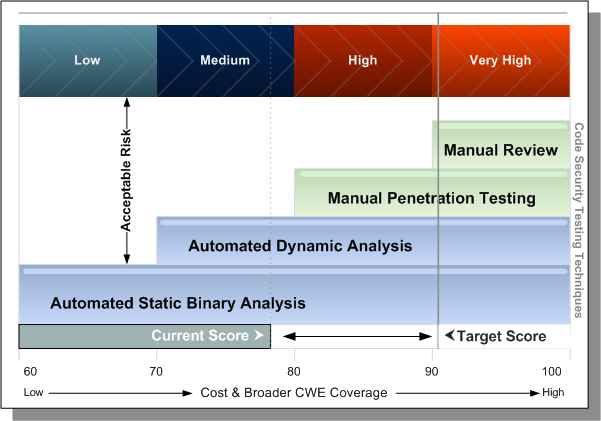
As an application’s business criticality increases, multiple analysis techniques should be used to ensure a more accurate assessment of its security quality.
Use industry standard security scores
In the past, security solution providers used proprietary systems to assess the severity of vulnerabilities. This lack of standardization led to discrepancies between products and services, reducing the value of security assessments. In 2005, a coalition of security experts developed the Common Vulnerability Scoring System (CVSS)—a vendor-agnostic standard for evaluating vulnerability severity. CVSS helps businesses prioritize which flaws to fix.
Veracode integrates CVSS severity ratings and exploitability scores with other industry standards, such as the MITRE Common Weakness Enumeration (CWE), which classifies software weaknesses. This combination provides a comprehensive application security rating. Veracode is the only organization that merges these standards into a unified framework for evaluating software security across both internally and externally developed applications.
To determine a Security Quality Score (SQS), Veracode aggregates all detected security flaw severities and normalizes the result to a 0–100 scale, where 100 represents a perfect score. To compute the Veracode Level for each testing technique, Veracode then factors in the type of testing performed ((automated SAST and SCA) scans, automated DAST scans, and manual penetration testing (MPT)) and the application’s business criticality .
Set policies for acceptable thresholds
The overall Veracode Level (1–5) depends on the Security Quality Score (SQS), the severity of detected flaws, and completed scans. This allows businesses to establish policies for acceptable thresholds. These thresholds are based not only on the number and severity of vulnerabilities in the software but also on the risk the application poses to the business.
Policies include grace periods that set a timeframe in which development teams must remediate (resolve) all findings that violate policy, to bring the application back into compliance.
The type of testing performed on the application, along with the severity and types of detected flaws, determines its Veracode Level (VL). Each VL requires a minimum security score.
Select an appropriate application to scan
To determine which applications to scan, review supported languages and platforms for Static Analysis and SCA scans, and guidelines for Dynamic Analysis scans.
Findings
Findings are the flaws and vulnerabilities that Veracode scanning found in your application code and are available in the Veracode Platform. Veracode Risk Manager (VRM) imports findings from your assets and manages them as issues. Prioritize and resolve these findings to secure your applications and assets.
In the Veracode Platform, all findings for an application are available in the scan results. The results include the finding severities and guidance for resolving them. Use the Triage Flaws page and associated reports to prioritize SAST and DAST findings, and get actionable guidance on which findings to resolve.
Learn about reviewing findings and how to develop a remediation plan for resolving them.
Scoring methodology
To determine the security risk for an application during scanning, the Veracode Platform uses a methodology and multiple analysis techniques to identify and assess findings, and provide a consolidated application security rating.
The Veracode Platform provides a score, on a scale of 1-100, that indicates the overall risk level of the application. This score is useful as a general assessment, but it's important that you review the severity of each finding for a more accurate assessment of the risk each finding poses to your application.
The Veracode Platform scoring system is based on industry-standard classifications of security findings and exploit impact.
To learn about risk assessment and scoring using Veracode Risk Manager, see Using factors.
Policies
Use security policies in the Veracode Platform to establish a consistent security policy for all, or specific, applications in your organization.
The policy constraints specify rules, with which application code must comply, and grace periods, which specify how much time teams must resolve finding to bring an application into compliance.
By default, policies are based on the application's business criticality, risk tolerance, and its anticipated use.
To learn about policies for Veracode Package Firewall, see Manage policies.
Analytics
Analytics in the Veracode Platform provides a view of your application risk and compliance across your entire application portfolio.
Use the dashboards and data visualizations to gain insights into the overall security posture of your entire application portfolio. For example, you can track findings and policy compliance across applications and understand what scans your organization uses, who submits them, and how often. You can also identify finding trends and their status (Open, Closed, Reopened), among other insights.
Your organization can use this data to proactively resolve findings and improve its application security posture.
Reports
Use reports in the Veracode Platform to evaluate findings and their resolution. Specific reporting features help you verify that findings are resolved.
The reports are available in the Veracode Platform, Veracode integrations, and as downloadable PDF and XML files.
Example reports include:
Veracode Fix
Use Veracode Fix to apply AI-generated patches to flaws found by Veracode Pipeline Scan. To automate fixes, integrate Veracode Fix.