Veracode Dynamic Analysis
Veracode Dynamic Analysis is a Dynamic Application Security Testing (DAST) solution that provides automated and scalable dynamic scanning for broad coverage at speed. You can use the Veracode Platform to analyze web applications and REST APIs.
For an improved experience, we recommend using DAST. See the quickstart.
Workflow
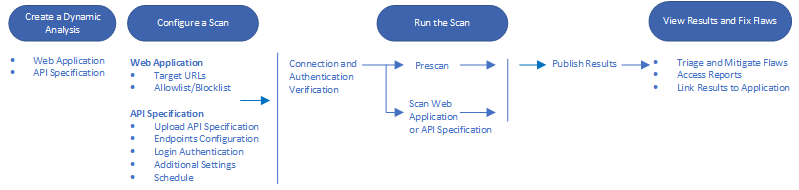
The Dynamic Analysis workflow for scanning web applications or API specifications consists of steps to configure the scan, run the scan, and view the results.
Benefits
You can use Dynamic Analysis to perform the following actions:
-
Run security tests on live web applications and APIs in the late stages of development, such as test or quality assurance, or with minimal impact web applications or APIs in production.
-
Run authenticated or unauthenticated analyses. The web applications or APIs can be internal to your organization or accessible from the public internet. Review the best practices for web applications.
- To analyze web applications, see Scan web applications.
- To analyze REST APIs, see Scan API specifications.
-
Use Selenium to create crawl scripts of recorded actions to take on web applications. You can customize these scripts to test specific features and components of a web application. Review the best practices.
-
Define and manage policies for securing your web applications and APIs. Link the results to an application profile to evaluate them against your policies.
-
Generate reports of analysis results that you can use to make informed plans, communicate performance metrics, and produce the evidence necessary to meet regulatory requirements.
Prerequisites
Before using Dynamic Analysis, ensure you meet the prerequisites.
Best practices
Before using Dynamic Analysis, we recommend reviewing the best practices.
Discover assets
To discover your organization's web applications and APIs that you can scan with Dynamic Analysis, use Veracode EASM. EASM is not integrated with Dynamic Analysis, but you can use the results to identify assets that might need to be secured.
Access Dynamic Analysis
To access Dynamic Analysis, sign in to the Veracode Platform and select Scans and Analysis > Dynamic Analysis. Then, create an analysis to scan web applications or API specifications.
You can also automate dynamic scanning tasks using the REST API. For additional testing coverage of your web applications and APIs, consider contacting Veracode to schedule penetration testing on your assets.
Scan internal web apps and APIs
To analyze web applications and APIs behind a firewall, set up Internal Scanning Management (ISM).